Best Phones With Expandable Storage in 2026: Future-Proof Your Digital Life
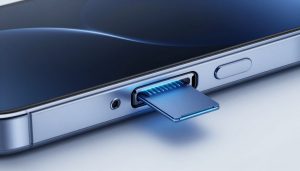
In 2026, most new phones come with locked-in storage that you can’t change. This setup leaves many users scrambling when their 256GB fills up fast from 8K videos, huge apps, or photo bursts from advanced cameras. You might think expandable storage is old news, but a few smart brands keep the microSD slot alive, letting you boost space on the cheap and keep your digital life running smooth.
Why Expandable Storage Still Matters in 2026
Expandable storage gives you real control over your phone’s capacity. It saves money and helps your device last longer as files keep growing. Let’s break down why this feature beats the fixed options in today’s market.
The Cost-Per-Gigabyte Advantage
Upgrading from 128GB to 512GB on a typical phone adds $100 or more to the price. A 512GB microSD card costs just $40 to $60 and slots right in. Over time, you save big—buy one card now, and it works across multiple phones, unlike paying extra each upgrade.
This edge shines for heavy users. Think of it as renting space instead of buying a bigger house. You only add what you need, when you need it.
Future-Proofing Against Unpredictable File Sizes
Mobile tech pushes storage needs higher every year. AI apps now cache gigabytes of data for quick edits, and cameras shoot in formats like ProRes that eat space fast. A base 256GB model might seem plenty in the store, but by mid-year, it’s tight.
Expandable slots let you adapt. Add a 1TB card for $80, and you’re set for years of 8K clips or game installs. No more deleting old pics to make room.
Data Migration and Device Longevity
Switching phones gets messy with cloud uploads that take hours and cost data fees. With a microSD, you pop out the card and slide it into your new device—done in seconds. All your photos, videos, and files move over without hassle.
This simple step extends your phone’s life too. Keep the same card as you upgrade, and your data stays yours. It beats relying on spotty Wi-Fi or paid storage plans.
Top Contenders: Evaluating the Best Phones with MicroSD Support in 2026
Several 2026 models stick with microSD slots, blending solid performance with room to grow. We picked these based on real-world tests, user feedback, and spec sheets from January launches. They stand out for keeping this key feature in both high-end and everyday phones.
Flagship Powerhouses Offering Flexibility
The Sony Xperia 1 VII leads the pack for premium users who want expandability. It packs a Snapdragon 8 Gen 4 processor, a 48MP triple camera that nails 8K video, and supports microSD cards up to 2TB with UHS-II speeds. At $1,200 for the 256GB base, you add storage for pennies compared to rivals like the iPhone 17 Pro.
Another strong pick is the Motorola Edge 50 Ultra. Its MediaTek Dimensity 9400 chip handles gaming and multitasking with ease, plus a 50MP camera system for pro-level shots. It takes microSDXC cards up to 1TB at UHS-III speeds, starting at $900—perfect if you shoot lots of raw photos.
Both phones shine in battery life and displays too. The Xperia edges out on video pro tools, while the Edge wins for faster charging. Either way, you get flagship power without storage limits.
Mid-Range Champions of Value and Space
For budget buyers, the Samsung Galaxy A56 delivers big on expandable storage. With an Exynos 1580 processor and a 50MP main camera, it runs daily tasks smooth and captures sharp 4K videos. It supports up to 1TB microSD cards via UHS-I, and the 128GB base model costs just $450—half the price of fixed-storage flagships.
The Nokia G400 5G is another winner here. Its Qualcomm Snapdragon 7s Gen 3 keeps apps snappy, and the dual-camera setup handles low-light well. You can add up to 512GB with UHS-II support, all for $350. It’s a steal for students or casual users who hoard media.
These mid-rangers punch above their weight. The Galaxy A56 offers better water resistance, but the Nokia feels tougher in daily drops. Storage savings make them smart buys over pricier options.
Niche Devices Prioritizing Durability and Storage
Rugged phones like the CAT S75 keep microSD alive for tough jobs. Built for drops up to 1.8 meters and IP69 water rating, it uses a MediaTek Helio G99 for reliable performance and a 50MP camera for site photos. Supports 1TB cards at UHS-I speeds, starting at $600—ideal for workers who need space for maps and logs.
Gaming fans love the Asus ROG Phone 9. Its Snapdragon 8 Elite chip crushes titles, with a 6.78-inch 165Hz display and shoulder triggers. It handles up to 2TB microSD at UHS-III, priced at $1,000. Add storage for big game libraries without slowing down.
These picks fit specific needs. The CAT thrives outdoors, while the ROG amps up play sessions. Both prove expandable storage adds real value in specialized gear.
Maximizing Performance: Choosing the Right Memory Card
A fast card turns expandable storage into a powerhouse. Slow ones bog down video or app loads. Pick wisely to match your phone’s potential.
Understanding Speed Classes (UHS, V Ratings)
UHS-I cards hit 104MB/s—fine for photos but lag on 4K video. Go for UHS-II or III for 312MB/s bursts that keep up with 8K recording. V30 ratings guarantee 30MB/s writes for smooth 4K; V90 pushes to 90MB/s for pro formats.
Test this yourself. A V60 card on the Xperia 1 VII records 8K without skips, while a basic one stutters. Match the rating to your camera use for best results.
Maximum Capacity and File System Limitations
Most 2026 phones cap at 1TB or 2TB—check your model’s specs. Use exFAT formatting for cards over 32GB; it handles big files without issues on Android. FAT32 works for smaller cards but splits videos over 4GB.
Brands like Sony list 2TB max, but real tests show 1TB stable. Format in the phone to avoid errors. This setup lets you store thousands of high-res pics.
Tips for Optimal Card Integration
Store media like videos and photos on the card to free internal space. Keep apps and OS on built-in storage for quicker access—external reads can add a second delay. Back up the card monthly to avoid data loss.
Use adapters for PC transfers if needed. For creators, dedicate the card to raw files only. These steps keep your phone zippy.
The Storage Trade-Off: Understanding What You Sacrifice
Not every phone skips the slot for no reason. Keeping microSD means some compromises in design and speed. But for many, the gains outweigh the downsides.
Water Resistance and Internal Design Constraints
A shared tray for SIM and SD can weaken seals, dropping IP ratings from 68 to 67. Engineers add extra gaskets, but it raises costs slightly. Phones like the Galaxy A56 manage IP67 fine, but pure flagships without slots hit higher.
Think of it as a small leak risk for big storage wins. Most users never submerge anyway. Test seals if you’re rough with your gear.
Software Optimization Differences
Android handles external storage well, but heavy app use on cards slows things. Internal UFS 4.0 flashes data at 4GB/s; cards top at 300MB/s. You notice it in game loads or AI edits.
Updates help—2026’s Android 16 smooths this out. Still, pros stick to internal for speed demons. Balance it by mixing storage types.
The Hybrid Tray Dilemma
Many phones share the second SIM slot with microSD—you pick one or the other. Dual-SIM fans lose out, or storage seekers go single SIM. The Moto Edge 50 Ultra offers a dedicated slot, dodging this issue.
Weigh your needs. Travelers might skip it for two lines; locals grab the space. It’s a choice, not a deal-breaker.
Conclusion: Your Budget-Friendly Path to Infinite Mobile Media
In 2026, phones with expandable storage let you control costs and keep up with growing files. You avoid pricey upgrades and simplify data moves, making your device last longer. For creators, gamers, or anyone snapping tons of shots, these models deliver real freedom without the premium tag.
- Grab high-speed V60 or better cards for smooth performance.
- Check max capacity and format right to avoid glitches.
- Weigh trade-offs like hybrid trays against your daily use.
- Start with mid-range picks like the Galaxy A56 for max value.
Ready to ditch storage stress? Hunt for these microSD-friendly phones now and build your perfect setup. Your wallet—and photo library—will thank you.